
I shipped a macOS build of Squeal, a SQL
client I'm building, and it was completely unusable. CI was green, the release
page had a nice .zip attached, and every single person who downloaded it got
the same dialog:
"Squeal.app" is damaged and can't be opened. You should move it to the Trash.
Nothing was damaged. The download was fine. That message is macOS being
unhelpful about a code signing problem, and it took me way longer than it should
have to work that out, mostly because every Electron tutorial I could find stops
at electron-forge make and never mentions signing at all.
So here's the config I ended up with, and all the traps I walked into on the way.
Let's start with why that error message lies to you. "Damaged" sounds like a corrupt download or a bad zip, right? It isn't. What it actually means is that Gatekeeper took a look at your app's code signature and decided it wasn't valid.
When you download a file in a browser, macOS attaches a com.apple.quarantine
extended attribute to it, and on first launch Gatekeeper checks the signature of
anything carrying that flag. If there's no signature at all, you get the
friendly "unidentified developer" dialog with a right-click-to-open escape
hatch. But if there's a signature that fails validation, you get "damaged", and
there's no escape hatch at all.
The good news is that you don't have to guess which one you're hitting. You can reproduce the whole thing locally in two commands. Copy your built app, mark it as quarantined, and ask Gatekeeper directly:
cp -R out/MyApp-darwin-arm64/MyApp.app /tmp/qt.app
xattr -w com.apple.quarantine "0083;00000000;Safari;" /tmp/qt.app
spctl --assess --type execute --verbose /tmp/qt.app
On my broken build, that printed:
/tmp/qt.app: invalid Info.plist (plist or signature have been modified)
There it is. Not a damaged download, just a signature that doesn't match the app. And once I signed things properly, the exact same command on the exact same quarantined copy printed:
/tmp/qt.app: accepted
source=Developer ID
Run that against every build before you publish it.
Now here's the part that genuinely surprised me, and it's specific to Electron.
You'd expect an app you never signed to simply have no signature, right? But Electron's prebuilt binaries ship with an ad-hoc signature already applied, and the fuses plugin destroys it. You probably use that plugin, by the way, since it comes with the default template.
Fuses are build-time feature flags that toggle things like RunAsNode and
EnableNodeCliInspectArguments, and the way they work is by rewriting bytes
inside the Electron binary. Functionally that's completely fine. But flipping a
byte inside a signed binary invalidates its signature.
So an unsigned Electron app isn't really unsigned at all. It's carrying a signature that actively fails validation, which is exactly why macOS reaches for "damaged" instead of the much friendlier "unidentified developer". Two perfectly reasonable decisions — use the fuses plugin, don't bother signing while you're developing — combine into one very confusing failure.
The fix is to sign the app for real.
Let's start with the certificate. You need a paid Apple Developer Program membership, and there's no free path here, because notarization requires an Apple ID attached to a real team.
Once you're in, create a Developer ID Application certificate. Not "Mac App Distribution", not "Apple Development" — those are for the Mac App Store and for local testing. Developer ID is the one for apps you hand out yourself.
Install it, then confirm your machine can actually sign with it:
security find-identity -v -p codesigning
1) A8A50AAB447134FA3856408FD4030C6D5A6D95E5 "Developer ID Application: Your Company (TEAMID)"
   1 valid identities found
If your certificate doesn't show up in that list, the private key is missing, and a certificate without its key can't sign anything. You'll need to re-download it using the original CSR, or generate a new one.
That TEAMID in the parentheses is your team ID. Write it down, you'll need it
a few times.
With the certificate installed we can configure signing, which lives in
packagerConfig in your forge.config.ts. Notice that I gate the whole thing
on an environment variable:
packagerConfig: {
  appBundleId: 'co.example.myapp',
  icon: './assets/icons/icon',
  ...(process.env.APPLE_TEAM_ID && {
    osxSign: {
      identity: 'Developer ID Application',
      optionsForFile: (filePath: string) => {
        const isMainAppBundle =
          filePath.endsWith('.app') && !filePath.includes('Helper')

        return {
          hardenedRuntime: true,
          ...(isMainAppBundle && {
            entitlements: resolve(import.meta.dirname, 'entitlements.plist')
          })
        }
      }
    },
    osxNotarize: {
      appleId: process.env.APPLE_ID ?? '',
      appleIdPassword: process.env.APPLE_APP_SPECIFIC_PASSWORD ?? '',
      teamId: process.env.APPLE_TEAM_ID
    }
  })
}
That gate on APPLE_TEAM_ID matters more than it looks. Without it, nobody can
build your app unless they have your certificate, which breaks contributors,
forks, and your own quick local builds. With the gate, yarn make works
everywhere and signing only kicks in when the credentials are actually there.
You'll also want to set appBundleId explicitly, because the default is
com.electron.<name> and you really don't want that out in the wild. It has to
stay stable forever, too. Notarization and keychain access both key off it, so
changing it later orphans anything your app stored in the keychain.
And optionsForFile runs for every single binary in the bundle, of which there
are a lot: helper apps, frameworks, native modules. Entitlements belong on the
main app bundle only, while the helpers just need the hardened runtime and
nothing else. Get this wrong and you get mysterious crashes.
Next up is the entitlements file. Notarization requires the hardened runtime,
and the hardened runtime happily blocks a bunch of things Electron needs. Create
entitlements.plist in your project root:
<?xml version="1.0" encoding="UTF-8"?>
<!DOCTYPE plist PUBLIC "-//Apple//DTD PLIST 1.0//EN" "http://www.apple.com/DTDs/PropertyList-1.0.dtd">
<plist version="1.0">
<dict>
  <key>com.apple.security.cs.allow-jit</key>
  <true/>
  <key>com.apple.security.cs.allow-unsigned-executable-memory</key>
  <true/>
  <key>com.apple.security.cs.disable-library-validation</key>
  <true/>
</dict>
</plist>
Each key in there fixes something specific:
allow-jitandallow-unsigned-executable-memory— V8 compiles JavaScript to machine code at runtime and then runs it, which is precisely what the hardened runtime exists to prevent, so you have to ask for an exception.disable-library-validation— this is the one that gets you if you have native modules. Library validation refuses to load code signed by a different team, so without it any.nodebinding fails to load and you get a runtime crash in a signed build that ran perfectly well unsigned.
If your app is pure JavaScript with no native dependencies, you can try dropping that third one. If you bundle anything with a native binding, keep it.
That brings us to notarization itself, which is Apple scanning your signed app for malware and issuing a ticket that says it passed. Since macOS 10.15 it's effectively mandatory if you want people to be able to open your app at all.
The osxNotarize block above handles it, but you need an app-specific
password, because your regular Apple ID password will not work:
- Go to appleid.apple.com and sign in
- Sign-In and Security → App-Specific Passwords → +
- Name it something like
myapp-notarization - Copy the
xxxx-xxxx-xxxx-xxxxvalue
Before you wire this into CI, check that the credentials actually work. It takes a few seconds and saves you a failed release:
xcrun notarytool history --apple-id "you@example.com" \
  --password "xxxx-xxxx-xxxx-xxxx" --team-id TEAMID
If that returns a history, even an empty one, all three notarization credentials are correct and work together. An auth error means the password is wrong, or your Apple ID doesn't have the right role on the team — you need to be Account Holder, Admin, or App Manager.
One thing to be aware of is that notarization adds a few minutes to every build. It's an upload, a queue, and a scan, so don't expect it to be instant.
Now for what you actually ship. The default Forge template hands macOS users a
.zip, which makes for a pretty poor first run. The app ends up unzipped in
Downloads and runs from there, never making it anywhere near the Applications
folder.
Use a DMG for the download instead:
yarn add -D @electron-forge/maker-dmg
makers: [
  new MakerDMG({ icon: './assets/icons/icon.icns' }, ['darwin']),
  new MakerZIP({}, ['darwin'])
]
Two traps here, and I fell into both.
The first one is that you shouldn't set name on MakerDMG. With no name,
the maker outputs MyApp-<version>-<arch>.dmg, but set one and every
architecture produces the same filename. Build arm64 and x64 in separate CI
jobs, upload both to the same release, and the second one quietly overwrites the
first.
The second one is to keep the ZIP, even though nothing appears to use it. This
nearly cost me macOS auto-updates. Squirrel.Mac can't read a DMG, so if you
update through autoUpdater or update-electron-app, that zip is the only
format it can install. Remove the zip maker and macOS updates stop working while
every build stays green. update.electronjs.org also matches on the filename,
MyApp-darwin-arm64-<version>.zip, to pick the right architecture.
So: DMG for humans, ZIP for the updater.
Before we get to CI, a quick warning about fuses. Once you learn that flipping
them breaks the ad-hoc signature, the fix looks pretty obvious.
@electron/fuses has an option for exactly this, so you set it:
new FusesPlugin({
  version: FuseVersion.V1,
  resetAdHocDarwinSignature: true, // ← don't do this
  ...
})
Don't. I did, then read the plugin's source and took it straight back out.
Here's what @electron-forge/plugin-fuses is already doing for you:
await flipFuses(pathToElectronExecutable, {
  resetAdHocDarwinSignature:
    !hasOSXSignConfig && applePlatforms.includes(platform) && arch === 'arm64',
  ...this.fusesConfig
})
It sets the flag itself, and only when there's no osxSign config, which is
exactly the unsigned-local-build case. And notice that ...this.fusesConfig is
spread after, so your value wins and overrides that logic entirely. You'd be
forcing it on for signed builds too.
It also can't do what you're hoping it does. The plugin runs at
packageAfterCopy, before Electron Packager rewrites Info.plist with your
app's name and bundle ID. So it signs, then the plist changes underneath the
signature, and you're right back to an invalid signature. I confirmed this on a
real build, where the app still reported Identifier=com.github.Electron and
failed codesign --verify.
So leave it alone. The valid signature comes from osxSign, which runs at the
very end of packaging, after everything else has settled down.
Signing locally is fine for testing, but you want your releases to be reproducible, and that means getting your certificate onto a CI runner.
First, export it. In Keychain Access, find your Developer ID Application certificate under login → My Certificates. Expand it and make sure there's a private key underneath. Then right-click → Export, choose Personal Information Exchange (.p12), and set a strong password.
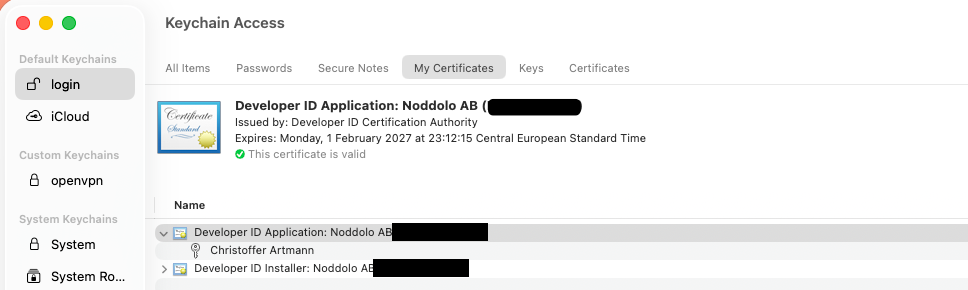
Check that the export actually contains that key, because a cert-only .p12
fails in CI in a really confusing way:
openssl pkcs12 -in cert.p12 -info -noout -passin pass:'YOUR_PASSWORD'
You want to see both a certBag and a PKCS8ShroudedKeyBag in there. Then
base64 it:
base64 -i cert.p12 -o cert.p12.b64
Add five repository secrets: APPLE_CERTIFICATE (the base64 blob),
APPLE_CERTIFICATE_PASSWORD, APPLE_ID, APPLE_APP_SPECIFIC_PASSWORD, and
APPLE_TEAM_ID.
On the runner, the certificate goes into a temporary keychain:
- name: Import Apple certificate
  if: startsWith(matrix.os, 'macos')
  env:
    APPLE_CERTIFICATE: ${{ secrets.APPLE_CERTIFICATE }}
    APPLE_CERTIFICATE_PASSWORD: ${{ secrets.APPLE_CERTIFICATE_PASSWORD }}
  run: |
    CERTIFICATE_PATH=$RUNNER_TEMP/certificate.p12
    KEYCHAIN_PATH=$RUNNER_TEMP/app-signing.keychain-db
    KEYCHAIN_PASSWORD=$(openssl rand -base64 32)

    echo -n "$APPLE_CERTIFICATE" | base64 --decode -o $CERTIFICATE_PATH

    security create-keychain -p "$KEYCHAIN_PASSWORD" $KEYCHAIN_PATH
    security set-keychain-settings -lut 21600 $KEYCHAIN_PATH
    security unlock-keychain -p "$KEYCHAIN_PASSWORD" $KEYCHAIN_PATH

    security import $CERTIFICATE_PATH -P "$APPLE_CERTIFICATE_PASSWORD" \
      -A -t cert -f pkcs12 -k $KEYCHAIN_PATH
    security set-key-partition-list -S apple-tool:,apple: \
      -k "$KEYCHAIN_PASSWORD" $KEYCHAIN_PATH

    security list-keychain -d user -s $KEYCHAIN_PATH
That's a throwaway keychain with a random password, thrown away along with the
runner. The set-key-partition-list call is the non-obvious one — leave it out
and codesign hangs forever, waiting for a UI prompt that nobody is ever going
to answer.
Then pass the credentials through to the build:
- name: Build artifacts
  run: yarn make
  env:
    APPLE_APP_SPECIFIC_PASSWORD: ${{ secrets.APPLE_APP_SPECIFIC_PASSWORD }}
    APPLE_ID: ${{ secrets.APPLE_ID }}
    APPLE_TEAM_ID: ${{ secrets.APPLE_TEAM_ID }}
If you support Intel Macs, you'll need a second runner. macos-latest is Apple
silicon, so that's the only architecture it can build correctly. Reach for
--arch=x64 and you'll get a broken app the moment you have native
dependencies, because those ship per-architecture prebuilt bindings and your
package manager only installs the one matching the runner.
Use a separate job instead:
strategy:
  matrix:
    os: [macos-latest, macos-15-intel]
macos-15-intel is GitHub's Intel image, and it's worth knowing that it's the
last one. It's available until August 2027, and after that x86_64 isn't
supported on GitHub Actions at all.
There are also two guards worth adding, because that environment-variable gate
has a nasty edge to it. If a secret goes missing in CI, osxSign never runs and
you happily publish an unsigned app. That's the exact bug you set out to fix,
except now the release looks like a success.
So check for them explicitly:
- name: Check Apple signing secrets
  if: startsWith(matrix.os, 'macos')
  shell: bash
  env:
    APPLE_TEAM_ID: ${{ secrets.APPLE_TEAM_ID }}
    # ...and the rest
  run: |
    missing=()

    for name in APPLE_APP_SPECIFIC_PASSWORD APPLE_CERTIFICATE \
      APPLE_CERTIFICATE_PASSWORD APPLE_ID APPLE_TEAM_ID; do
      if [ -z "${!name}" ]; then
        missing+=("$name")
      fi
    done

    if [ ${#missing[@]} -gt 0 ]; then
      echo "::error::Missing repository secrets: ${missing[*]}. Without them the app is unsigned and macOS reports it as damaged."
      exit 1
    fi
While you're in there, check that the makers actually produced something. A bare
find -exec exits 0 when nothing matches, so a maker that failed leaves you
with a green checkmark and a release that has no installer for that platform:
if [ ${#artifacts[@]} -eq 0 ]; then
  echo "::error::No installers found in out/make. Check the build step."
  exit 1
fi
Both of these guards exist for the same reason. The default behaviour is to fail silently, and in a release pipeline that's the worst kind of failure there is.
That leaves verification, which is three commands. Run them on the built app and actually read the output:
codesign --verify --deep --strict --verbose=2 out/MyApp-darwin-arm64/MyApp.app
spctl --assess --type execute --verbose out/MyApp-darwin-arm64/MyApp.app
xcrun stapler validate out/MyApp-darwin-arm64/MyApp.app
Here's what you want to see:
MyApp.app: valid on disk
MyApp.app: satisfies its Designated Requirement
MyApp.app: accepted
source=Notarized Developer ID
codesign -dv is worth a look too. Check three things: that the identifier is
your bundle ID and not com.github.Electron, that TeamIdentifier has a value,
and that the flags read flags=0x10000(runtime). That last one is your proof
that the hardened runtime is actually on:
codesign -dv out/MyApp-darwin-arm64/MyApp.app
Then launch the signed build and click around a bit. This matters more than it sounds, because the hardened runtime is exactly where native modules break, and a signed app is the first time that code path ever runs. So if you ship a native binding, open a connection, read a file, do the thing.
Have you shipped an Electron app to macOS? Let me know in the comments if you ran into any traps I missed!